Sunday, February 28, 2016

13. Minor Scales

The 12 notes within each octave is represented in the Python list called keys.


We use the semitone intervals of a minor scale, inside the minor list. The minor list contains the last two elements of major plus the first five elements. In Python we can use negative numbers to indicate index from last element.


Inside the main loop, iterated over all keys, we use i%7 (i modulo 7) as index into minor so we only access indexes 0 through 6.


Also we print a new line only if i is 7. The default end, for a print statement, is new line, unless we override it.


We can see A (natural) minor scale has same notes as C major (its relative). The only difference is the root is A or C in the two cases.


# mus13.py
# minor scales

import music21 as m21

major = [2,2,1,2,2,2,1]
# minor = last 2 + first 5 (of major)
minor = major[-2:]+major[:5]
print('minor = ',minor)

keys = ['C','C#','D','D#',
        'E','F','F#','G',
        'G#','A','A#','B']

print('The 12 minor scales:')
for key in keys:
    n = m21.note.Note(key)
    midi = n.pitch.midi
    for i in range(8):
        n = m21.note.Note(midi = midi)
        if i<7: print(n.name, end= ' - ')
        else: print(n.name)
        midi = n.pitch.midi
        midi += minor[i%7]

This will generate this output:


minor =  [2, 1, 2, 2, 1, 2, 2]
The 12 minor scales:
C - D - E- - F - G - G# - B- - C
C# - E- - E - F# - G# - A - B - C#
D - E - F - G - A - B- - C - D
E- - F - F# - G# - B- - B - C# - E-
E - F# - G - A - B - C - D - E
F - G - G# - B- - C - C# - E- - F
F# - G# - A - B - C# - D - E - F#
G - A - B- - C - D - E- - F - G
G# - B- - B - C# - E- - E - F# - G#
A - B - C - D - E - F - G - A
B- - C - C# - E- - F - F# - G# - B-
B - C# - D - E - F# - G - A - B

Saturday, February 27, 2016

12. Major Scales

There are 12 notes in each octave. They are in the Python list called keys. It can be written also all on one long line. However, here, it is broken into 3 lines.


We use the semitone intervals of a major scale, inside the major list.


Inside the main loop, iterated over all keys, we use i%7 (i modulo 7) as index into major so we only access indexes 0 through 6.


Also we print a new line only if i is 7. The default end, for a print statement, is new line, unless we override it.


# mus12.py
# major scales

import music21 as m21

major = [2,2,1,2,2,2,1]

keys = ['C','C#','D','D#',
        'E','F','F#','G',
        'G#','A','A#','B']

print('The 12 major scales:')
for key in keys:
    n = m21.note.Note(key)
    midi = n.pitch.midi
    for i in range(8):
        n = m21.note.Note(midi = midi)
        if i<7: print(n.name, end= ' - ')
        else: print(n.name)
        midi = n.pitch.midi
        midi += major[i%7]

This will generate this output:


The 12 major scales:
C - D - E - F - G - A - B - C
C# - E- - F - F# - G# - B- - C - C#
D - E - F# - G - A - B - C# - D
E- - F - G - G# - B- - C - D - E-
E - F# - G# - A - B - C# - E- - E
F - G - A - B- - C - D - E - F
F# - G# - B- - B - C# - E- - F - F#
G - A - B - C - D - E - F# - G
G# - B- - C - C# - E- - F - G - G#
A - B - C# - D - E - F# - G# - A
B- - C - D - E- - F - G - A - B-
B - C# - E- - E - F# - G# - B- - B

11. Names and Frequencies of notes

Note objects may be created by passing in a midi number in the range from 0 to 127. Since we start at 0, we have a total of 128 numbers.


For the Note object, we can find the name, the octave, as well as the nameWithOctave.


We also find the frequency of the associated Pitch object.


# mus11.py
# Names and Frequencies of notes

import music21 as m21

for midi in range(128):
    n = m21.note.Note(midi=midi)
    print_string = 'midi = {} \t{} \t{:.1f} Hz'
    print(print_string.format(midi,
                              n.nameWithOctave,
                              n.pitch.frequency))

This will generate output:


midi = 0  C-1  8.2 Hz
midi = 1  C#-1  8.7 Hz
midi = 2  D-1  9.2 Hz
midi = 3  E--1  9.7 Hz
midi = 4  E-1  10.3 Hz
midi = 5  F-1  10.9 Hz
midi = 6  F#-1  11.6 Hz
midi = 7  G-1  12.2 Hz
midi = 8  G#-1  13.0 Hz
midi = 9  A-1  13.7 Hz
midi = 10  B--1  14.6 Hz
midi = 11  B-1  15.4 Hz
midi = 12  C0  16.4 Hz
midi = 13  C#0  17.3 Hz
midi = 14  D0  18.4 Hz
midi = 15  E-0  19.4 Hz
midi = 16  E0  20.6 Hz
midi = 17  F0  21.8 Hz
midi = 18  F#0  23.1 Hz
midi = 19  G0  24.5 Hz
midi = 20  G#0  26.0 Hz
midi = 21  A0  27.5 Hz
midi = 22  B-0  29.1 Hz
midi = 23  B0  30.9 Hz
midi = 24  C1  32.7 Hz
midi = 25  C#1  34.6 Hz
midi = 26  D1  36.7 Hz
midi = 27  E-1  38.9 Hz
midi = 28  E1  41.2 Hz
midi = 29  F1  43.7 Hz
midi = 30  F#1  46.2 Hz
midi = 31  G1  49.0 Hz
midi = 32  G#1  51.9 Hz
midi = 33  A1  55.0 Hz
midi = 34  B-1  58.3 Hz
midi = 35  B1  61.7 Hz
midi = 36  C2  65.4 Hz
midi = 37  C#2  69.3 Hz
midi = 38  D2  73.4 Hz
midi = 39  E-2  77.8 Hz
midi = 40  E2  82.4 Hz
midi = 41  F2  87.3 Hz
midi = 42  F#2  92.5 Hz
midi = 43  G2  98.0 Hz
midi = 44  G#2  103.8 Hz
midi = 45  A2  110.0 Hz
midi = 46  B-2  116.5 Hz
midi = 47  B2  123.5 Hz
midi = 48  C3  130.8 Hz
midi = 49  C#3  138.6 Hz
midi = 50  D3  146.8 Hz
midi = 51  E-3  155.6 Hz
midi = 52  E3  164.8 Hz
midi = 53  F3  174.6 Hz
midi = 54  F#3  185.0 Hz
midi = 55  G3  196.0 Hz
midi = 56  G#3  207.7 Hz
midi = 57  A3  220.0 Hz
midi = 58  B-3  233.1 Hz
midi = 59  B3  246.9 Hz
midi = 60  C4  261.6 Hz
midi = 61  C#4  277.2 Hz
midi = 62  D4  293.7 Hz
midi = 63  E-4  311.1 Hz
midi = 64  E4  329.6 Hz
midi = 65  F4  349.2 Hz
midi = 66  F#4  370.0 Hz
midi = 67  G4  392.0 Hz
midi = 68  G#4  415.3 Hz
midi = 69  A4  440.0 Hz
midi = 70  B-4  466.2 Hz
midi = 71  B4  493.9 Hz
midi = 72  C5  523.3 Hz
midi = 73  C#5  554.4 Hz
midi = 74  D5  587.3 Hz
midi = 75  E-5  622.3 Hz
midi = 76  E5  659.3 Hz
midi = 77  F5  698.5 Hz
midi = 78  F#5  740.0 Hz
midi = 79  G5  784.0 Hz
midi = 80  G#5  830.6 Hz
midi = 81  A5  880.0 Hz
midi = 82  B-5  932.3 Hz
midi = 83  B5  987.8 Hz
midi = 84  C6  1046.5 Hz
midi = 85  C#6  1108.7 Hz
midi = 86  D6  1174.7 Hz
midi = 87  E-6  1244.5 Hz
midi = 88  E6  1318.5 Hz
midi = 89  F6  1396.9 Hz
midi = 90  F#6  1480.0 Hz
midi = 91  G6  1568.0 Hz
midi = 92  G#6  1661.2 Hz
midi = 93  A6  1760.0 Hz
midi = 94  B-6  1864.7 Hz
midi = 95  B6  1975.5 Hz
midi = 96  C7  2093.0 Hz
midi = 97  C#7  2217.5 Hz
midi = 98  D7  2349.3 Hz
midi = 99  E-7  2489.0 Hz
midi = 100  E7  2637.0 Hz
midi = 101  F7  2793.8 Hz
midi = 102  F#7  2960.0 Hz
midi = 103  G7  3136.0 Hz
midi = 104  G#7  3322.4 Hz
midi = 105  A7  3520.0 Hz
midi = 106  B-7  3729.3 Hz
midi = 107  B7  3951.1 Hz
midi = 108  C8  4186.0 Hz
midi = 109  C#8  4434.9 Hz
midi = 110  D8  4698.6 Hz
midi = 111  E-8  4978.0 Hz
midi = 112  E8  5274.0 Hz
midi = 113  F8  5587.7 Hz
midi = 114  F#8  5919.9 Hz
midi = 115  G8  6271.9 Hz
midi = 116  G#8  6644.9 Hz
midi = 117  A8  7040.0 Hz
midi = 118  B-8  7458.6 Hz
midi = 119  B8  7902.1 Hz
midi = 120  C9  8372.0 Hz
midi = 121  C#9  8869.8 Hz
midi = 122  D9  9397.3 Hz
midi = 123  E-9  9956.1 Hz
midi = 124  E9  10548.1 Hz
midi = 125  F9  11175.3 Hz
midi = 126  F#9  11839.8 Hz
midi = 127  G9  12543.9 Hz

Wednesday, February 24, 2016

10. Primary Triads in C

The three lists correspond to chords I, IV, and V, for key of 'C4'.


The purpose of addChord is to add a chord I, IV, or V, randomly, with the condition that that we have a change in chord.


The function randint from the standard random module, will generate a random integer within the given limits, and including those limits, that is, randint(0,2) can result in 0, 1 or 2.


The global variable num contains the last value indicating which chord was added. That is, num = 0 (chord I), num = 1, (chord IV), or num = 2 (chord V).


After each time, addChord() function is called it will calculate a new_num which is the value of randint(0,2). If it happens to be the same as last value (num), new_num is calculated again. This loop continues until the new_num is different from num. Then new_num replaces the value of num.


From now on, I will use a key of 'C' for the writeMIDI function. In the piano roll, the key does not matter, only on the score so it can put the appropriate sharps and flats.


# mus10.py
# Primary Triads in key of C

from writeMIDI import writeMIDI
from random import randint

# beats per minute
bpm = 130

tonic = ['C4','E4','G4']
subdominant = ['F4','A4','C5']
dominant = ['G4','B4','D5']

notes = []

start = -1
num = randint(0,2)

def addChord(n):
    global num
    global start
    start += 1
    print('num = {}'.format(num))
    if num == 0:
        for ch in tonic:
            n.append((ch,start,1,115))
    if num == 1:
        for ch in subdominant:
            n.append((ch,start,1,120))
    if num == 2:
        for ch in dominant:
            n.append((ch,start,1,125))
    new_num = randint(0,2)
    while new_num == num:
        new_num = randint(0,2)
    num = new_num
            
for i in range(20):
    addChord(notes)

writeMIDI('C','piano',bpm,notes,'mus10')

A possible output might be:

num = 0
num = 1
num = 2
num = 0
num = 2
num = 1
num = 2
num = 0
num = 1
num = 0
num = 2
num = 1
num = 2
num = 1
num = 2
num = 0
num = 2
num = 0
num = 2
num = 0

This will generate this:


9. Natural Minor Scale

The Python list, minor, contains the semitone intervals for the natural minor scale.


Each time, the scale function is called, it will increase the global variable start by 8, or two measures. If we did not indicate it is global inside function definition, it will try to look for a local variable and complain.


Now the scale function can be called with kind equal to 'major' or 'minor'.


The scale function is called twice with the two different kinds of scale. If we did not have a start which changes, it will write to same 2 measures.


# mus9.py
# D natural minor scale
# D major scale

import music21 as m21
from writeMIDI import writeMIDI

# beats per minute
bpm = 130

major = [2,2,1,2,2,2,1]
minor = [2,1,2,2,1,2,2] 

notes = []

start = 0

def scale(key, n, kind):
    global start
    start += 8
    print('\nkey = {}'.format(key))
    p = m21.pitch.Pitch(key)
    midi = p.midi
    for i in range(8):
        print('midi of {} added'.format(midi))
        n.append((midi,start+i,1,120))
        if kind == 'major': midi += major[i%7]
        elif kind == 'minor': midi += minor[i%7]

scale('D',notes,'minor')
scale('D',notes,'major')
writeMIDI('C',"piano",bpm,notes,'mus9')

The output is:

key = D
midi of 62 added
midi of 64 added
midi of 65 added
midi of 67 added
midi of 69 added
midi of 70 added
midi of 72 added
midi of 74 added

key = D
midi of 62 added
midi of 64 added
midi of 66 added
midi of 67 added
midi of 69 added
midi of 71 added
midi of 73 added
midi of 74 added

This will generate this:


Tuesday, February 23, 2016

8. Consonant to Dissonant Intervals

There is a list, interval, of 13 elements. While it is possible to write it all on one line, sometimes it is better to write on multiple lines.


The function, base, adds 13 'C4' quarter notes at beat 0, 2, 4, and so on. The 'C4' is midi number 60.


The function, consonant_to_dissonant, will add intervals such that midi number is 60 + appropriate interval. Again in this function, we use commas to separate lines.


# mus8.py
# consonant to dissonant intervals

from writeMIDI import writeMIDI

# beats per minute
bpm = 130

notes = []
midi = 60

# consonant to dissonant (semitones)
interval = [0, # Unison/prime
            12, # Octave
            7, # Perfect fifth
            5, # Perfect fourth
            4, # Major third
            8, # Minor sixth
            3, # Minor third
            9, # Major sixth
            2, # Major second
            10, # Minor seventh
            1, # Minor second
            11, # Major seventh
            6] # Augmented fourth/diminished fifth

def base(n):
    "Add 13 C4 quarter notes"
    for i in range(13):
        n.append((midi,2*i,1,120))
        
def consonant_to_dissonant(n):
    "Intervals from consonant to dissonant"
    for i in range(13):
        n.append((midi+interval[i], # Note midi number
                  2*i,              # Start in quarter lengths
                  1,                # Duration is 1 quarter note
                  120))             # Volume is 120

base(notes)
consonant_to_dissonant(notes)
writeMIDI('C','piano',bpm,notes,'mus8')

This will generate this:


Sunday, February 21, 2016

7. Drone bass

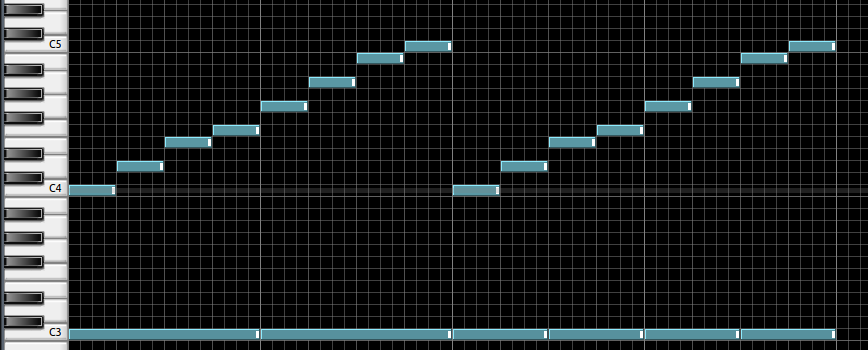
A C major scale has 8 notes. If all are quarter notes, one C major scale takes 2 measures, assuming no rests.


Here we have two C major scales over 4 measures, which is done by the function scale().


A drone consisting of note C3, two whole notes for first 2 measures, and four half notes for the next 2 measures, which is done by the function drone().


We can always include a documentation string as the first line of a function.


The first 2 and last 2 measures will sound different due to the increasing number of notes in the last 2 measures.


# mus7.py
# drone bass

from writeMIDI import writeMIDI

# beats per minute
bpm = 130

major = [2,2,1,2,2,2,1]

notes = []

def scale(n):
    "Add two C major scales (4 measures)"
    for j in range(2):
        midi = 60
        for i in range(8):
            n.append((midi,8*j+i,1,120))
            midi += major[i%7]

def drone(n):
    "Add drone C3 over 4 measures"
    n.append((48,0,4,115)) # whole note, measure 1
    n.append((48,4,4,115)) # whole note, measure 2
    n.append((48,8,2,115)) # half note, measure 3 - first half
    n.append((48,10,2,115)) # half note, measure 3 - second half
    n.append((48,12,2,115)) # half note, measure 4 - first half
    n.append((48,14,2,115)) # half note, measure 4 - second half
             
scale(notes)
drone(notes)
writeMIDI('C','piano',bpm,notes,'mus7')

This will generate this: